Documentation Index

Fetch the complete documentation index at: https://docs.tagada.io/llms.txt

Use this file to discover all available pages before exploring further.

Get an API key from code

TL;DR — Run one command, paste a 6-digit code from your inbox, get an API key. No browser, no dashboard, no copy-pasting.
npx -p @tagadapay/node-sdk@latest tagada-init you@example.com
That’s the whole onboarding. It mails you a code, verifies it, provisions a fresh sandbox account + a demo-seeded store, and writes TAGADA_API_KEY, TAGADA_STORE_ID, and TAGADA_ACCOUNT_ID into the .env of the directory you’re in.
Why this exists. AI coding tools (Claude, Cursor, Lovable, v0…) are great at writing storefront code, but they can’t click through a signup form. So we exposed the same flow as a CLI command and a public SDK call — both end with a working API key in your hands.

Pick your path

You’re…Use thisWhy
Following a tutorial / hacking on your laptoptagada-init CLI (below)Interactive, writes .env for you
Building an installer / scaffolding toolTagada.public() SDK (below)Programmatic, no prompts
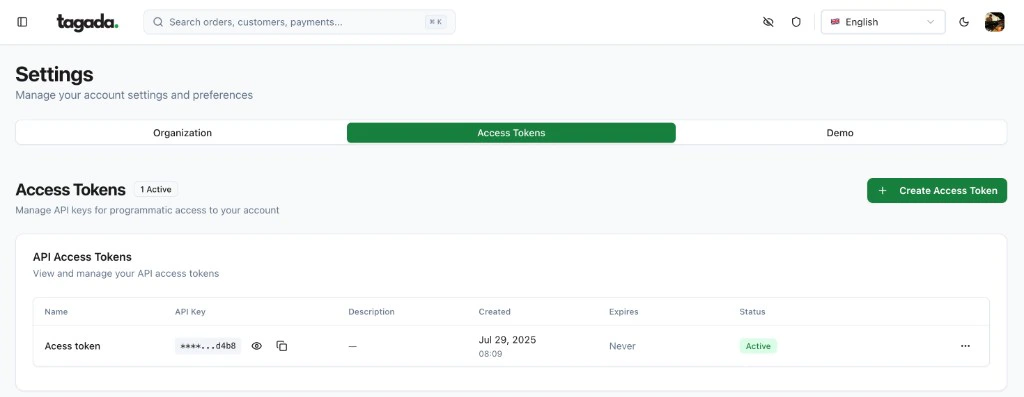
Already have a Tagada accountDashboard → Settings → Access TokensOne-click new key for an existing account
All three end with the same thing: a UUID-shaped API key that works against https://api.tagada.io.

Path 1 — The CLI (interactive)

npx -p @tagadapay/node-sdk@latest tagada-init you@example.com
What happens, step by step:
1

The CLI calls /api/public/onboarding/start

A 6-digit code lands in you@example.com within a few seconds. The email subject is “Verify your TagadaPay account” — the code is only inside the body, never in the subject or lock-screen preview.
2

You paste the code

The CLI prompts you. Type the 6 digits, hit enter.
3

The CLI calls /api/public/onboarding/verify

On success it gets back an apiKey, storeId, and accountId, and writes them to .env in the current directory:
# generated by tagada-init
TAGADA_API_KEY=ed8a…
TAGADA_STORE_ID=store_…
TAGADA_ACCOUNT_ID=acc_…
It also writes framework-specific mirrors when relevant:
FrameworkVariables added
ViteVITE_TAGADA_STORE_ID, VITE_TAGADA_ACCOUNT_ID
Next.jsNEXT_PUBLIC_TAGADA_STORE_ID, NEXT_PUBLIC_TAGADA_ACCOUNT_ID
AstroPUBLIC_TAGADA_STORE_ID, PUBLIC_TAGADA_ACCOUNT_ID
4

A demo store seeds in the background

Sandbox processor, payment flow, 2 demo products (an Essential Tee in 3 colorways and an Essential Cap), one checkout upsell, and a default shipping rate. Takes ~10 seconds. Your API key is usable immediately — the catalog populates as the seeder runs.Want a richer 6-product apparel catalog? Examples like headless-react-store ship a scripts/seed.ts you can run with pnpm seed $TAGADA_API_KEY to extend the demo.
Skip prompts entirely (CI, scripted demos, AI agents). Because the user has to read the OTP from an inbox between the two API calls, the CLI exposes a two-stage flow so any orchestrator can drive it without a TTY:
# 1. Mail the code (returns immediately, no prompt).
npx -p @tagadapay/node-sdk@latest tagada-init you@example.com --start-only

# 2. After the user pastes the code into your agent / form / CI input:
npx -p @tagadapay/node-sdk@latest tagada-init you@example.com \
  --code=123456 --non-interactive
FlagWhat it does
--start-onlyCalls /start only — mails the OTP and exits with code 0. Re-invoke later with --code to verify.
--code=NNNNNNSkips the /start call (assumes the code is already in flight) and calls /verify directly. Pair with --non-interactive to avoid any TTY fallback.
--non-interactiveRefuses to prompt. Fails fast (exit code 2) if --code is missing.
--source=<id>Tags the onboarding attempt for analytics (docs-llm-test, my-installer-v1, etc.).
Three-line shell sketch for an LLM-mediated flow:
npx -p @tagadapay/node-sdk@latest tagada-init you@example.com --start-only
read -p "Code from inbox: " CODE
npx -p @tagadapay/node-sdk@latest tagada-init you@example.com --code=$CODE --non-interactive

Path 2 — The SDK (programmatic)

If you’re writing your own script (an AI agent, a CI step, an installer for your framework), call the SDK directly. Tagada.public() returns a no-auth client — its only job is to bootstrap a key for new Tagada(apiKey):
import Tagada from '@tagadapay/node-sdk';

const onboarding = Tagada.public(); // hits api.tagada.io by default

// 1. Mail a 6-digit code to the user.
await onboarding.start({
  email: 'you@example.com',
  source: 'my-installer-v1',
});

// 2. Once you have the code (interactive prompt, query string, etc.):
const result = await onboarding.verify({
  email: 'you@example.com',
  code: '123456',
});

console.log(result.apiKey);   // ready to use
console.log(result.storeId);  // demo store created for you
console.log(result.accountId);

// 3. Drop it into the regular client:
const tagada = new Tagada(result.apiKey);
const store = await tagada.stores.retrieve(result.storeId);
The shape of result:
{
  ok: true,
  apiKey:       string,   // UUID, use immediately
  accountId:    string,   // 'acc_…'
  storeId:      string,   // 'store_…' — demo seeding starts in background
  clerkUserId:  string,   // 'user_…'
  clerkOrgId:   string,   // 'org_…'
  orgSlug:      string | null,
  demoSeeding:  'pending', // poll tagada.stores.retrieve(...) if you need to wait
}

Error handling

onboarding.start and onboarding.verify throw an OnboardingError with a typed code field — no string-sniffing required:
import Tagada, { OnboardingError } from '@tagadapay/node-sdk';

try {
  await Tagada.public().verify({ email, code });
} catch (err) {
  if (!(err instanceof OnboardingError)) throw err;

  switch (err.code) {
    case 'invalid_code':       /* user mistyped — let them retry */ break;
    case 'expired':            /* code older than 5 minutes — call start again */ break;
    case 'no_pending_code':    /* claim already used or never sent */ break;
    case 'too_many_attempts':  /* 5 wrong tries on the same code */ break;
    case 'rate_limited':       /* throttled — err.resetAt is a Date */ break;
    case 'email_send_failed':  /* transient — retry start */ break;
    case 'provisioning_failed':/* server side — retry verify, claim auto-released */ break;
    case 'network_error':      /* connection / timeout */ break;
    case 'invalid_request':    /* bad payload (e.g. malformed email) */ break;
  }
}
Same email twice? Both tagada-init and Tagada.public() mint a fresh sandbox account on every successful verify. If you re-run with an email that already has an account, the call will succeed and you’ll get a brand-new account — keep track of the keys you’ve generated.

Path 3 — The dashboard (existing account)

If you already have a Tagada account and just need a new key:
1

Open Settings

Click your avatar (top-right) → Settings.
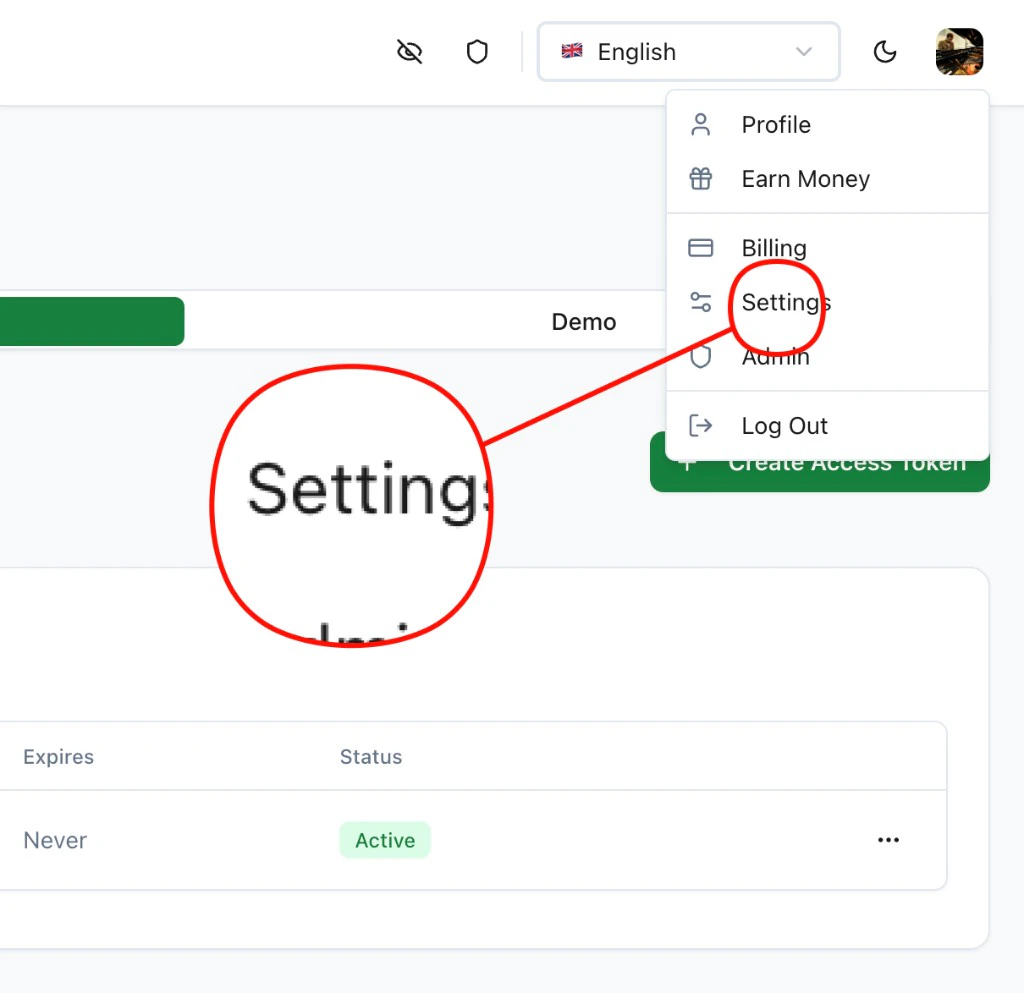
Navigate to Settings from the user menu
2

Generate the key

Go to Access Tokens+ Create Access Token. Copy the UUID.
Access Tokens page in Settings

What the API key gives you

The key minted via tagada-init / Tagada.public() has org:admin scope on the new account — it can do everything the SDK exposes:
SurfaceWhat you can call
Stores & productstagada.stores.*, tagada.products.*
Processors & flowstagada.processors.*, tagada.paymentFlows.*
Payments & orderstagada.payments.*, tagada.orders.*
Customers & substagada.customers.*, tagada.subscriptions.*
Webhookstagada.webhooks.*, tagada.events.*
Plugins / pagestagada.plugins.*
For multi-tenant setups that mint per-merchant keys from a partner account, see the Partners tab.

Security model — quick notes

  • OTP delivery: 6-digit, single-use, expires after 5 minutes. Generated with a CSPRNG (crypto.randomInt).
  • Rate limits: 3 sends / 10 min / IP and 5 sends / hour / email on start; 10 verifies / 10 min / IP on verify (fail-closed if our cache is unavailable, so brute-forcing isn’t possible during outages).
  • Lock-screen-safe email: the subject is "Verify your TagadaPay account" and the lock-screen preview is "Open this email to see your verification code." — the code itself is only inside the email body.
  • Single-claim provisioning: even if verify is called twice in parallel with the same correct code, only one of the calls provisions an account — the other gets no_pending_code.

Next steps

Build a store with AI

Use Claude, Lovable, or v0 with the key you just minted.

Node SDK Quick Start

Create stores, products, and process payments from your server.