> ## Documentation Index
> Fetch the complete documentation index at: https://docs.tagada.io/llms.txt
> Use this file to discover all available pages before exploring further.
# Node SDK Quick Start
> Create stores, deploy pages, and process payments from your server in 5 minutes
# Node SDK Quick Start
**Time**: \~5 minutes | **Difficulty**: Beginner
**When to use this SDK:**
* Server automation: AI agents, CI/CD pipelines, batch jobs
* Programmatically managing stores, products, payments, customers, subscriptions
* Verifying webhook signatures
* **Provisioning sub-merchants and minting per-merchant API keys** (`tagada.partners.*` — see the [Partners section](/developer-tools/partners/introduction))
**When NOT to use this SDK:**
* Anything that runs in a browser — tokenization, 3DS challenges, wallet sheets → use [`@tagadapay/core-js`](/developer-tools/payments/headless-payments) or the [Headless SDK](/developer-tools/headless-sdk/introduction)
* Custom checkout UI on your own domain → pair this SDK with the [Headless SDK](/developer-tools/headless-sdk/introduction) on the browser side
**Want TagadaPay to process your cards?** (direct merchant, not a partner platform) See [Apply for TagadaPay Processing](/developer-tools/node-sdk/processing-applications) — `processing.applications.create()` with your CRM key.
**Building a payment platform that charges for MANY merchants?** Jump straight to the [Partners tab](/developer-tools/partners/introduction) — it walks through the full multi-tenant flow with sub-keys, auto-provisioned stores, and APMs.
***
## What Is the Node SDK?
The Node SDK lets you control TagadaPay **from your server**. Think of it as the backend counterpart to the Plugin SDK — while the Plugin SDK builds the checkout UI, the Node SDK manages everything behind it.
```
┌──────────────────────────────────────────────┐
│ Your server / script / CI pipeline │
│ ↓ │
│ @tagadapay/node-sdk │
│ ↓ │
│ TagadaPay REST API │
│ • Create stores & products │
│ • Deploy checkout pages │
│ • Set up multi-step funnels │
│ • Process & route payments across PSPs │
│ • Manage subscriptions & customers │
└──────────────────────────────────────────────┘
```
**Why use the Node SDK?** If you're an AI agent, a CI/CD pipeline, a custom backend, or just prefer code over dashboards — this is how you talk to TagadaPay programmatically.
***
## Prerequisites
* **Node.js 18+** ([nodejs.org](https://nodejs.org) — run `node --version` to check)
* **A TagadaPay API key** — get one in 30 seconds (next section)
***
## Get an API key in 30 seconds
You have three options. The first one is what AI coding tools / installers should use; the last one is what you'd do if you already have an account.
Run this in the directory where you want your `.env`:
```bash theme={null}
npx -p @tagadapay/node-sdk@latest tagada-init you@example.com
```
Paste the 6-digit code from your inbox when prompted. Done — `TAGADA_API_KEY`, `TAGADA_STORE_ID`, and `TAGADA_ACCOUNT_ID` are now in `.env`.
For scripts, AI agents, or framework installers:
```ts theme={null}
import Tagada from '@tagadapay/node-sdk';
const onboarding = Tagada.public();
await onboarding.start({ email: 'you@example.com' });
// ...prompt the user / read from a query string...
const { apiKey, storeId } = await onboarding.verify({
email: 'you@example.com',
code: '123456',
});
const tagada = new Tagada(apiKey); // ready to call any resource
```
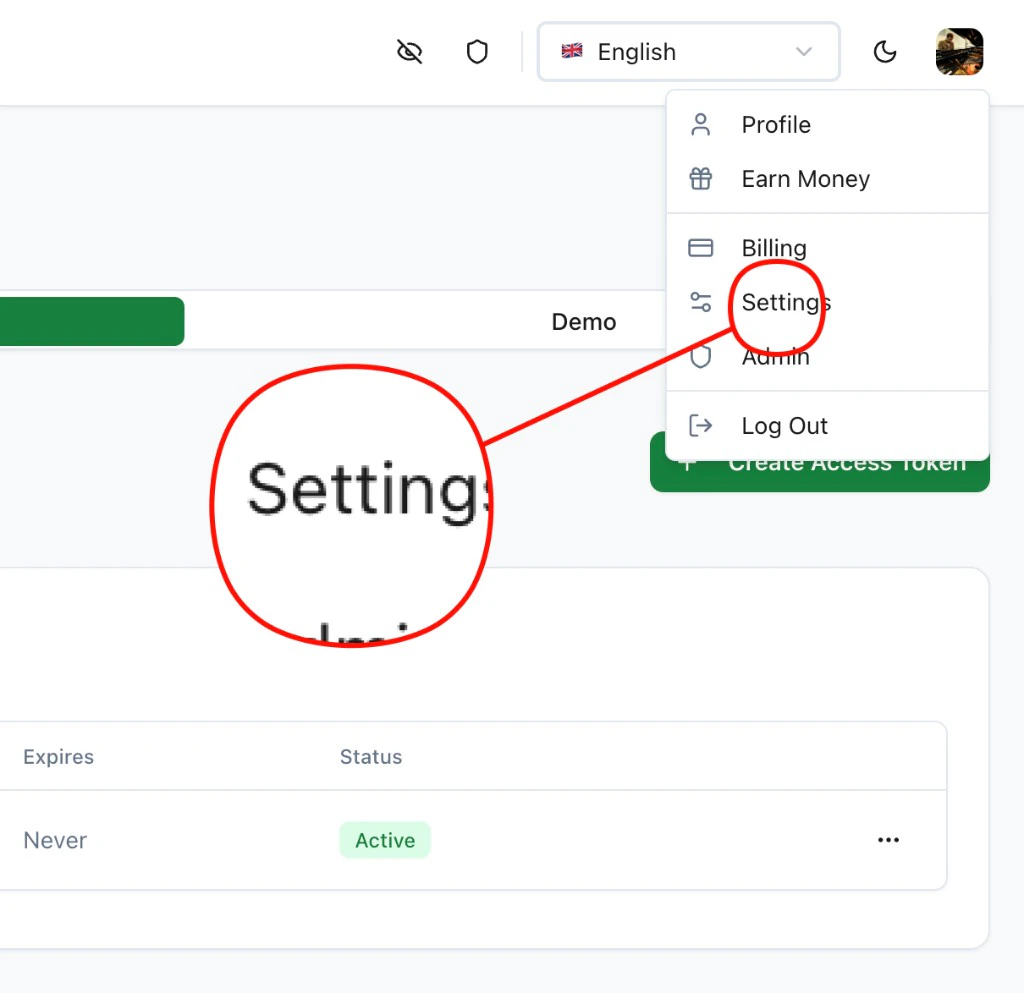
1. Click your avatar (top-right) → **Settings**
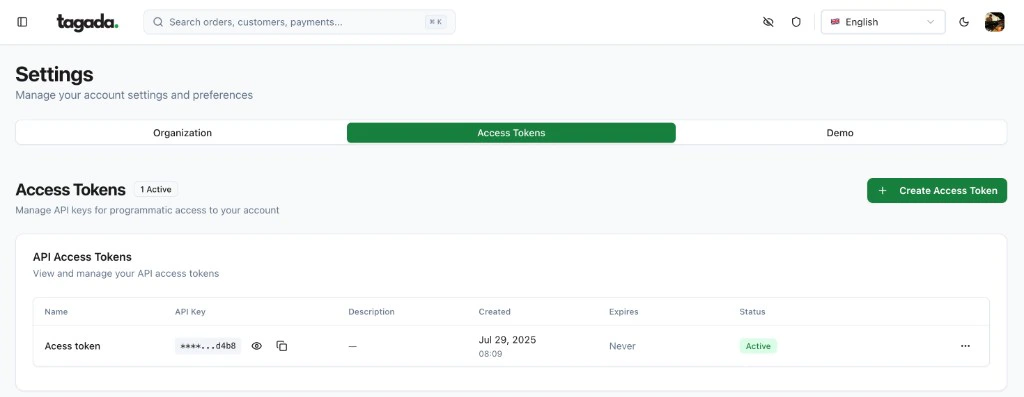
 2. **Access Tokens** → **+ Create Access Token** → copy the UUID.
 Full guide with error-handling, security notes, and the framework-specific env-var mirrors `tagada-init` writes (Vite / Next / Astro): [Get an API key from code](/developer-tools/node-sdk/get-api-key).
***
## Install
```bash theme={null}
npm install @tagadapay/node-sdk
```
***
## Initialize
```ts theme={null}
import Tagada from '@tagadapay/node-sdk';
const tagada = new Tagada('your-api-key');
```
That's it. Every resource is now available via `tagada.`.
***
## Example: Full Checkout Setup in 7 Steps
This script creates a processor, payment flow, store, product, and funnel — activates the checkout — then generates a checkout session link. No plugin deployment needed; TagadaPay's native checkout is auto-injected.
```ts theme={null}
import Tagada from '@tagadapay/node-sdk';
const tagada = new Tagada('your-api-key');
// 1. Create a sandbox processor (or use 'stripe', 'nmi', etc.)
const { processor } = await tagada.processors.create({
processor: {
name: 'Sandbox', type: 'sandbox', enabled: true,
supportedCurrencies: ['USD'], baseCurrency: 'USD',
options: { testMode: true },
},
});
// 2. Create a payment flow
const flow = await tagada.paymentFlows.create({
data: {
name: 'Default', strategy: 'simple',
fallbackMode: false, maxFallbackRetries: 0,
threeDsEnabled: false, stickyProcessorEnabled: false,
pickProcessorStrategy: 'weighted',
processorConfigs: [{ processorId: processor.id, weight: 100, disabled: false, nonStickable: false }],
fallbackProcessorConfigs: [], abuseDetectionConfig: null,
},
});
// 3. Create a store with the payment flow
const store = await tagada.stores.create({
name: 'My Store', baseCurrency: 'USD',
presentmentCurrencies: ['USD', 'EUR'], chargeCurrencies: ['USD'],
selectedPaymentFlowId: flow.id,
});
// 4. Create a product
const product = await tagada.products.create({
storeId: store.id, name: 'Premium Plan', active: true,
variants: [{
name: 'Monthly', sku: 'premium-monthly', grams: 0,
price: 2999, compareAtPrice: 0, active: true, default: true,
prices: [{ currencyOptions: { USD: { amount: 2999 } }, recurring: false, billingTiming: 'in_advance', default: true }],
}],
});
const variantId = product.variants[0].id;
// 5. Create a funnel (native checkout auto-injected)
const funnel = await tagada.funnels.create({
storeId: store.id,
config: {
id: 'my-checkout', name: 'My Checkout', version: '1.0.0',
nodes: [
{ id: 'step_checkout', name: 'Checkout', type: 'checkout', kind: 'step', isEntry: true, position: { x: 0, y: 0 }, config: { path: '/checkout' } },
{ id: 'step_thankyou', name: 'Thank You', type: 'thankyou', kind: 'step', position: { x: 300, y: 0 }, config: { path: '/thankyou' } },
],
edges: [{ id: 'e1', source: 'step_checkout', target: 'step_thankyou' }],
},
isDefault: true,
});
// 6. Activate (mounts routes, checkout goes live)
const result = await tagada.funnels.update(funnel.id, {
storeId: store.id, config: funnel.config,
});
const funnelCheckoutUrl = result.funnel.config.nodes
.find(n => n.id === 'step_checkout').config.url;
console.log('Funnel live at:', funnelCheckoutUrl);
// 7. Create a checkout session — shareable link with pre-loaded cart
const session = await tagada.checkout.createSession({
storeId: store.id,
items: [{ variantId, quantity: 1 }],
currency: 'USD',
checkoutUrl: funnelCheckoutUrl,
});
console.log('Checkout link:', session.redirectUrl);
```
For a detailed walkthrough of each step, see the [Merchant Quick Start](/developer-tools/node-sdk/merchant-quickstart). For deploying your own pages (checkout, landing, offers) instead of the native checkout, see [Funnel Pages](/developer-tools/node-sdk/custom-checkout).
***
## Available Resources
Every resource follows the same patterns: `list`, `retrieve`, `create`, `update`, `del`.
| Resource | Examples |
| ------------------------------- | ------------------------------------------------------------------------------------------------------------------------------------------------------------------------------------- |
| **`tagada.stores`** | `.list()`, `.create(...)`, `.retrieve(id)` |
| **`tagada.products`** | `.list(...)`, `.create(...)`, `.update(...)` |
| **`tagada.payments`** | `.list(...)`, `.process(...)`, `.refund(...)`, `.void(...)` |
| **`tagada.paymentFlows`** | `.create(...)`, `.listWithProcessors()` — define how payments cascade across PSPs |
| **`tagada.funnels`** | `.create(...)`, `.update(id, ...)`, `.promote(id, ...)` — multi-step flows with auto-routing |
| **`tagada.shopify`** | `.checkScript(storeId)`, `.updateScript(storeId, ...)`, `.removeScript(storeId)`, `.audit(storeId)` — [Shopify checkout script](/developer-tools/shopify/checkout-script) |
| **`tagada.plugins`** | `.deployDirectory(...)` (recommended), `.deploy(...)`, `.instantiate(...)`, `.mount(...)`, `.configureSplit(...)` — host pages on TagadaPay's CDN with A/B testing |
| **`tagada.subscriptions`** | `.create(...)`, `.cancel(...)`, `.rebill(id)`, `.changeProcessor(...)` |
| **`tagada.customers`** | `.list(...)`, `.retrieve(id)` |
| **`tagada.orders`** | `.list(...)`, `.retrieve(id)` |
| **`tagada.webhooks`** | `.create(...)`, `.list(...)`, `.del(id)` |
| **`tagada.events`** | `.recent(...)`, `.list(...)`, `.statistics(...)` — event log and audit trail |
| **`tagada.emailTemplates`** | `.create(...)`, `.list(...)`, `.update(...)`, `.test(...)`, `.del(...)` — [Emails guide](/developer-tools/headless-sdk/emails) |
| **`tagada.promotions`** | `.create(...)`, `.list(...)`, `.update(...)` — discounts |
| **`tagada.promotionCodes`** | `.create(...)`, `.list(...)` — discount codes |
| **`tagada.offers`** | `.list(...)`, `.create(...)` — upsells, downsells, order bumps |
| **`tagada.blockRules`** | `.create(...)`, `.list(...)`, `.del(...)` — fraud prevention |
| **`tagada.paymentInstruments`** | `.createFromToken(...)`, `.list(...)`, `.retrieve(id)`, `.del(id)` — stored payment methods |
| **`tagada.checkoutOffers`** | `.list(...)`, `.create(...)`, `.update(...)`, `.del(...)` — checkout-scoped offers |
| **`tagada.checkout`** | `.createSession(...)`, `.pay(...)` — create checkout links and process payments server-side |
| **`tagada.processors`** | `.list()`, `.create(...)`, `.retrieve(id)`, `.update(...)`, `.del([ids])` — manage PSP connections |
| **`tagada.domains`** | `.add(...)`, `.list(...)`, `.verify(...)`, `.remove(...)`, `.getConfig(...)`, `.getDnsLookup(...)` — [Custom Domains guide](/developer-tools/node-sdk/custom-checkout#custom-domains) |
***
## Payment Flows: The Core of TagadaPay
TagadaPay is **PSP-agnostic**. You connect multiple processors (Stripe, Adyen, NMI, etc.) and define **payment flows** that route transactions intelligently.
```ts theme={null}
const flow = await tagada.paymentFlows.create({
data: {
name: 'US Primary',
strategy: 'cascade', // 'simple' = single processor, 'cascade' = fallback chain
fallbackMode: true,
maxFallbackRetries: 3,
threeDsEnabled: false,
stickyProcessorEnabled: true,
pickProcessorStrategy: 'weighted', // 'weighted' | 'lowestCapacity' | 'automatic'
processorConfigs: [
{ processorId: 'proc_stripe', weight: 60, disabled: false, nonStickable: false },
{ processorId: 'proc_adyen', weight: 40, disabled: false, nonStickable: false },
],
fallbackProcessorConfigs: [
{ processorId: 'proc_nmi', orderIndex: 0 },
],
},
});
```
60% of traffic goes to Stripe, 40% to Adyen. If both fail, NMI picks up the payment. All automatic.
***
## Error Handling
The SDK throws typed errors you can catch individually:
```ts theme={null}
import Tagada, {
TagadaNotFoundError,
TagadaValidationError,
TagadaAuthenticationError,
TagadaRateLimitError,
} from '@tagadapay/node-sdk';
try {
await tagada.payments.retrieve('pay_nonexistent');
} catch (err) {
if (err instanceof TagadaNotFoundError) {
// 404 — resource doesn't exist
} else if (err instanceof TagadaValidationError) {
console.log(err.errors); // [{ field: 'amount', message: 'Required' }]
} else if (err instanceof TagadaRateLimitError) {
console.log(`Retry after ${err.retryAfter}s`);
}
}
```
Retries on `429`, `5xx`, and network errors are automatic (configurable via `maxRetries`).
***
## Configuration
```ts theme={null}
const tagada = new Tagada({
apiKey: 'your-api-key',
baseUrl: 'https://app.tagadapay.com/api/public/v1', // default
timeout: 30_000, // request timeout
maxRetries: 2, // auto-retry on failure
apiVersion: '2025-01-01',
});
```
Pass an `idempotencyKey` to safely retry mutations:
```ts theme={null}
await tagada.payments.process(params, { idempotencyKey: 'unique-key-123' });
```
***
## TypeScript
Fully typed. Import any type you need:
```ts theme={null}
import type { Payment, Customer, Subscription, TagadaList } from '@tagadapay/node-sdk';
```
***
## Next Steps
Create and customize transactional emails — order confirmations, subscription receipts, cart recovery
Real-time notifications and event log for payments, subscriptions, and more
Recurring billing, trials, retries, processor migration
Connect multiple Stripe accounts, vault cards, and cascade transactions
Deep dive into multi-step funnels with routing, A/B testing, and analytics
Full REST API documentation
Full guide with error-handling, security notes, and the framework-specific env-var mirrors `tagada-init` writes (Vite / Next / Astro): [Get an API key from code](/developer-tools/node-sdk/get-api-key).
***
## Install
```bash theme={null}
npm install @tagadapay/node-sdk
```
***
## Initialize
```ts theme={null}
import Tagada from '@tagadapay/node-sdk';
const tagada = new Tagada('your-api-key');
```
That's it. Every resource is now available via `tagada.`.
***
## Example: Full Checkout Setup in 7 Steps
This script creates a processor, payment flow, store, product, and funnel — activates the checkout — then generates a checkout session link. No plugin deployment needed; TagadaPay's native checkout is auto-injected.
```ts theme={null}
import Tagada from '@tagadapay/node-sdk';
const tagada = new Tagada('your-api-key');
// 1. Create a sandbox processor (or use 'stripe', 'nmi', etc.)
const { processor } = await tagada.processors.create({
processor: {
name: 'Sandbox', type: 'sandbox', enabled: true,
supportedCurrencies: ['USD'], baseCurrency: 'USD',
options: { testMode: true },
},
});
// 2. Create a payment flow
const flow = await tagada.paymentFlows.create({
data: {
name: 'Default', strategy: 'simple',
fallbackMode: false, maxFallbackRetries: 0,
threeDsEnabled: false, stickyProcessorEnabled: false,
pickProcessorStrategy: 'weighted',
processorConfigs: [{ processorId: processor.id, weight: 100, disabled: false, nonStickable: false }],
fallbackProcessorConfigs: [], abuseDetectionConfig: null,
},
});
// 3. Create a store with the payment flow
const store = await tagada.stores.create({
name: 'My Store', baseCurrency: 'USD',
presentmentCurrencies: ['USD', 'EUR'], chargeCurrencies: ['USD'],
selectedPaymentFlowId: flow.id,
});
// 4. Create a product
const product = await tagada.products.create({
storeId: store.id, name: 'Premium Plan', active: true,
variants: [{
name: 'Monthly', sku: 'premium-monthly', grams: 0,
price: 2999, compareAtPrice: 0, active: true, default: true,
prices: [{ currencyOptions: { USD: { amount: 2999 } }, recurring: false, billingTiming: 'in_advance', default: true }],
}],
});
const variantId = product.variants[0].id;
// 5. Create a funnel (native checkout auto-injected)
const funnel = await tagada.funnels.create({
storeId: store.id,
config: {
id: 'my-checkout', name: 'My Checkout', version: '1.0.0',
nodes: [
{ id: 'step_checkout', name: 'Checkout', type: 'checkout', kind: 'step', isEntry: true, position: { x: 0, y: 0 }, config: { path: '/checkout' } },
{ id: 'step_thankyou', name: 'Thank You', type: 'thankyou', kind: 'step', position: { x: 300, y: 0 }, config: { path: '/thankyou' } },
],
edges: [{ id: 'e1', source: 'step_checkout', target: 'step_thankyou' }],
},
isDefault: true,
});
// 6. Activate (mounts routes, checkout goes live)
const result = await tagada.funnels.update(funnel.id, {
storeId: store.id, config: funnel.config,
});
const funnelCheckoutUrl = result.funnel.config.nodes
.find(n => n.id === 'step_checkout').config.url;
console.log('Funnel live at:', funnelCheckoutUrl);
// 7. Create a checkout session — shareable link with pre-loaded cart
const session = await tagada.checkout.createSession({
storeId: store.id,
items: [{ variantId, quantity: 1 }],
currency: 'USD',
checkoutUrl: funnelCheckoutUrl,
});
console.log('Checkout link:', session.redirectUrl);
```
For a detailed walkthrough of each step, see the [Merchant Quick Start](/developer-tools/node-sdk/merchant-quickstart). For deploying your own pages (checkout, landing, offers) instead of the native checkout, see [Funnel Pages](/developer-tools/node-sdk/custom-checkout).
***
## Available Resources
Every resource follows the same patterns: `list`, `retrieve`, `create`, `update`, `del`.
| Resource | Examples |
| ------------------------------- | ------------------------------------------------------------------------------------------------------------------------------------------------------------------------------------- |
| **`tagada.stores`** | `.list()`, `.create(...)`, `.retrieve(id)` |
| **`tagada.products`** | `.list(...)`, `.create(...)`, `.update(...)` |
| **`tagada.payments`** | `.list(...)`, `.process(...)`, `.refund(...)`, `.void(...)` |
| **`tagada.paymentFlows`** | `.create(...)`, `.listWithProcessors()` — define how payments cascade across PSPs |
| **`tagada.funnels`** | `.create(...)`, `.update(id, ...)`, `.promote(id, ...)` — multi-step flows with auto-routing |
| **`tagada.shopify`** | `.checkScript(storeId)`, `.updateScript(storeId, ...)`, `.removeScript(storeId)`, `.audit(storeId)` — [Shopify checkout script](/developer-tools/shopify/checkout-script) |
| **`tagada.plugins`** | `.deployDirectory(...)` (recommended), `.deploy(...)`, `.instantiate(...)`, `.mount(...)`, `.configureSplit(...)` — host pages on TagadaPay's CDN with A/B testing |
| **`tagada.subscriptions`** | `.create(...)`, `.cancel(...)`, `.rebill(id)`, `.changeProcessor(...)` |
| **`tagada.customers`** | `.list(...)`, `.retrieve(id)` |
| **`tagada.orders`** | `.list(...)`, `.retrieve(id)` |
| **`tagada.webhooks`** | `.create(...)`, `.list(...)`, `.del(id)` |
| **`tagada.events`** | `.recent(...)`, `.list(...)`, `.statistics(...)` — event log and audit trail |
| **`tagada.emailTemplates`** | `.create(...)`, `.list(...)`, `.update(...)`, `.test(...)`, `.del(...)` — [Emails guide](/developer-tools/headless-sdk/emails) |
| **`tagada.promotions`** | `.create(...)`, `.list(...)`, `.update(...)` — discounts |
| **`tagada.promotionCodes`** | `.create(...)`, `.list(...)` — discount codes |
| **`tagada.offers`** | `.list(...)`, `.create(...)` — upsells, downsells, order bumps |
| **`tagada.blockRules`** | `.create(...)`, `.list(...)`, `.del(...)` — fraud prevention |
| **`tagada.paymentInstruments`** | `.createFromToken(...)`, `.list(...)`, `.retrieve(id)`, `.del(id)` — stored payment methods |
| **`tagada.checkoutOffers`** | `.list(...)`, `.create(...)`, `.update(...)`, `.del(...)` — checkout-scoped offers |
| **`tagada.checkout`** | `.createSession(...)`, `.pay(...)` — create checkout links and process payments server-side |
| **`tagada.processors`** | `.list()`, `.create(...)`, `.retrieve(id)`, `.update(...)`, `.del([ids])` — manage PSP connections |
| **`tagada.domains`** | `.add(...)`, `.list(...)`, `.verify(...)`, `.remove(...)`, `.getConfig(...)`, `.getDnsLookup(...)` — [Custom Domains guide](/developer-tools/node-sdk/custom-checkout#custom-domains) |
***
## Payment Flows: The Core of TagadaPay
TagadaPay is **PSP-agnostic**. You connect multiple processors (Stripe, Adyen, NMI, etc.) and define **payment flows** that route transactions intelligently.
```ts theme={null}
const flow = await tagada.paymentFlows.create({
data: {
name: 'US Primary',
strategy: 'cascade', // 'simple' = single processor, 'cascade' = fallback chain
fallbackMode: true,
maxFallbackRetries: 3,
threeDsEnabled: false,
stickyProcessorEnabled: true,
pickProcessorStrategy: 'weighted', // 'weighted' | 'lowestCapacity' | 'automatic'
processorConfigs: [
{ processorId: 'proc_stripe', weight: 60, disabled: false, nonStickable: false },
{ processorId: 'proc_adyen', weight: 40, disabled: false, nonStickable: false },
],
fallbackProcessorConfigs: [
{ processorId: 'proc_nmi', orderIndex: 0 },
],
},
});
```
60% of traffic goes to Stripe, 40% to Adyen. If both fail, NMI picks up the payment. All automatic.
***
## Error Handling
The SDK throws typed errors you can catch individually:
```ts theme={null}
import Tagada, {
TagadaNotFoundError,
TagadaValidationError,
TagadaAuthenticationError,
TagadaRateLimitError,
} from '@tagadapay/node-sdk';
try {
await tagada.payments.retrieve('pay_nonexistent');
} catch (err) {
if (err instanceof TagadaNotFoundError) {
// 404 — resource doesn't exist
} else if (err instanceof TagadaValidationError) {
console.log(err.errors); // [{ field: 'amount', message: 'Required' }]
} else if (err instanceof TagadaRateLimitError) {
console.log(`Retry after ${err.retryAfter}s`);
}
}
```
Retries on `429`, `5xx`, and network errors are automatic (configurable via `maxRetries`).
***
## Configuration
```ts theme={null}
const tagada = new Tagada({
apiKey: 'your-api-key',
baseUrl: 'https://app.tagadapay.com/api/public/v1', // default
timeout: 30_000, // request timeout
maxRetries: 2, // auto-retry on failure
apiVersion: '2025-01-01',
});
```
Pass an `idempotencyKey` to safely retry mutations:
```ts theme={null}
await tagada.payments.process(params, { idempotencyKey: 'unique-key-123' });
```
***
## TypeScript
Fully typed. Import any type you need:
```ts theme={null}
import type { Payment, Customer, Subscription, TagadaList } from '@tagadapay/node-sdk';
```
***
## Next Steps
Create and customize transactional emails — order confirmations, subscription receipts, cart recovery
Real-time notifications and event log for payments, subscriptions, and more
Recurring billing, trials, retries, processor migration
Connect multiple Stripe accounts, vault cards, and cascade transactions
Deep dive into multi-step funnels with routing, A/B testing, and analytics
Full REST API documentation