> ## Documentation Index
> Fetch the complete documentation index at: https://docs.tagada.io/llms.txt
> Use this file to discover all available pages before exploring further.
# Get an API key from code
> Mint a Tagada API key in 30 seconds — from a script, an AI tool, or your terminal. No dashboard, no browser.
# Get an API key from code
> **TL;DR** — Run one command, paste a 6-digit code from your inbox, get an API key. No browser, no dashboard, no copy-pasting.
```bash theme={null}
npx -p @tagadapay/node-sdk@latest tagada-init you@example.com
```
That's the whole onboarding. It mails you a code, verifies it, provisions a fresh sandbox account + a demo-seeded store, and writes `TAGADA_API_KEY`, `TAGADA_STORE_ID`, and `TAGADA_ACCOUNT_ID` into the `.env` of the directory you're in.
**Why this exists.** AI coding tools (Claude, Cursor, Lovable, v0…) are great at writing storefront code, but they can't click through a signup form. So we exposed the same flow as a CLI command and a public SDK call — both end with a working API key in your hands.
***
## Pick your path
| You're… | Use this | Why |
| --------------------------------------------- | ---------------------------------------- | ----------------------------------------- |
| Following a tutorial / hacking on your laptop | **`tagada-init` CLI** (below) | Interactive, writes `.env` for you |
| Building an installer / scaffolding tool | **`Tagada.public()` SDK** (below) | Programmatic, no prompts |
| Already have a Tagada account | **Dashboard → Settings → Access Tokens** | One-click new key for an existing account |
All three end with the same thing: a UUID-shaped API key that works against `https://api.tagada.io`.
***
## Path 1 — The CLI (interactive)
```bash theme={null}
npx -p @tagadapay/node-sdk@latest tagada-init you@example.com
```
What happens, step by step:
A 6-digit code lands in `you@example.com` within a few seconds. The email subject is **"Verify your TagadaPay account"** — the code is only inside the body, never in the subject or lock-screen preview.
The CLI prompts you. Type the 6 digits, hit enter.
On success it gets back an `apiKey`, `storeId`, and `accountId`, and writes them to `.env` in the current directory:
```bash theme={null}
# generated by tagada-init
TAGADA_API_KEY=ed8a…
TAGADA_STORE_ID=store_…
TAGADA_ACCOUNT_ID=acc_…
```
It also writes framework-specific mirrors when relevant:
| Framework | Variables added |
| ----------- | -------------------------------------------------------------- |
| **Vite** | `VITE_TAGADA_STORE_ID`, `VITE_TAGADA_ACCOUNT_ID` |
| **Next.js** | `NEXT_PUBLIC_TAGADA_STORE_ID`, `NEXT_PUBLIC_TAGADA_ACCOUNT_ID` |
| **Astro** | `PUBLIC_TAGADA_STORE_ID`, `PUBLIC_TAGADA_ACCOUNT_ID` |
Sandbox processor, payment flow, 2 demo products (an *Essential Tee* in 3 colorways and an *Essential Cap*), one checkout upsell, and a default shipping rate. Takes \~10 seconds. Your API key is usable immediately — the catalog populates as the seeder runs.
Want a richer 6-product apparel catalog? Examples like [`headless-react-store`](https://github.com/TagadaPay/examples/tree/main/headless-react-store) ship a `scripts/seed.ts` you can run with `pnpm seed $TAGADA_API_KEY` to extend the demo.
**Skip prompts entirely (CI, scripted demos, AI agents).** Because the user has to read the OTP from an inbox between the two API calls, the CLI exposes a **two-stage flow** so any orchestrator can drive it without a TTY:
```bash theme={null}
# 1. Mail the code (returns immediately, no prompt).
npx -p @tagadapay/node-sdk@latest tagada-init you@example.com --start-only
# 2. After the user pastes the code into your agent / form / CI input:
npx -p @tagadapay/node-sdk@latest tagada-init you@example.com \
--code=123456 --non-interactive
```
| Flag | What it does |
| ------------------- | ------------------------------------------------------------------------------------------------------------------------------------------------------ |
| `--start-only` | Calls `/start` only — mails the OTP and exits with code 0. Re-invoke later with `--code` to verify. |
| `--code=NNNNNN` | Skips the `/start` call (assumes the code is already in flight) and calls `/verify` directly. Pair with `--non-interactive` to avoid any TTY fallback. |
| `--non-interactive` | Refuses to prompt. Fails fast (exit code `2`) if `--code` is missing. |
| `--source=` | Tags the onboarding attempt for analytics (`docs-llm-test`, `my-installer-v1`, etc.). |
Three-line shell sketch for an LLM-mediated flow:
```bash theme={null}
npx -p @tagadapay/node-sdk@latest tagada-init you@example.com --start-only
read -p "Code from inbox: " CODE
npx -p @tagadapay/node-sdk@latest tagada-init you@example.com --code=$CODE --non-interactive
```
***
## Path 2 — The SDK (programmatic)
If you're writing your own script (an AI agent, a CI step, an installer for your framework), call the SDK directly. `Tagada.public()` returns a *no-auth* client — its only job is to bootstrap a key for `new Tagada(apiKey)`:
```ts theme={null}
import Tagada from '@tagadapay/node-sdk';
const onboarding = Tagada.public(); // hits api.tagada.io by default
// 1. Mail a 6-digit code to the user.
await onboarding.start({
email: 'you@example.com',
source: 'my-installer-v1',
});
// 2. Once you have the code (interactive prompt, query string, etc.):
const result = await onboarding.verify({
email: 'you@example.com',
code: '123456',
});
console.log(result.apiKey); // ready to use
console.log(result.storeId); // demo store created for you
console.log(result.accountId);
// 3. Drop it into the regular client:
const tagada = new Tagada(result.apiKey);
const store = await tagada.stores.retrieve(result.storeId);
```
The shape of `result`:
```ts theme={null}
{
ok: true,
apiKey: string, // UUID, use immediately
accountId: string, // 'acc_…'
storeId: string, // 'store_…' — demo seeding starts in background
clerkUserId: string, // 'user_…'
clerkOrgId: string, // 'org_…'
orgSlug: string | null,
demoSeeding: 'pending', // poll tagada.stores.retrieve(...) if you need to wait
}
```
### Error handling
`onboarding.start` and `onboarding.verify` throw an `OnboardingError` with a typed `code` field — no string-sniffing required:
```ts theme={null}
import Tagada, { OnboardingError } from '@tagadapay/node-sdk';
try {
await Tagada.public().verify({ email, code });
} catch (err) {
if (!(err instanceof OnboardingError)) throw err;
switch (err.code) {
case 'invalid_code': /* user mistyped — let them retry */ break;
case 'expired': /* code older than 5 minutes — call start again */ break;
case 'no_pending_code': /* claim already used or never sent */ break;
case 'too_many_attempts': /* 5 wrong tries on the same code */ break;
case 'rate_limited': /* throttled — err.resetAt is a Date */ break;
case 'email_send_failed': /* transient — retry start */ break;
case 'provisioning_failed':/* server side — retry verify, claim auto-released */ break;
case 'network_error': /* connection / timeout */ break;
case 'invalid_request': /* bad payload (e.g. malformed email) */ break;
}
}
```
**Same email twice?** Both `tagada-init` and `Tagada.public()` mint a *fresh* sandbox account on every successful verify. If you re-run with an email that already has an account, the call will succeed and you'll get a brand-new account — keep track of the keys you've generated.
***
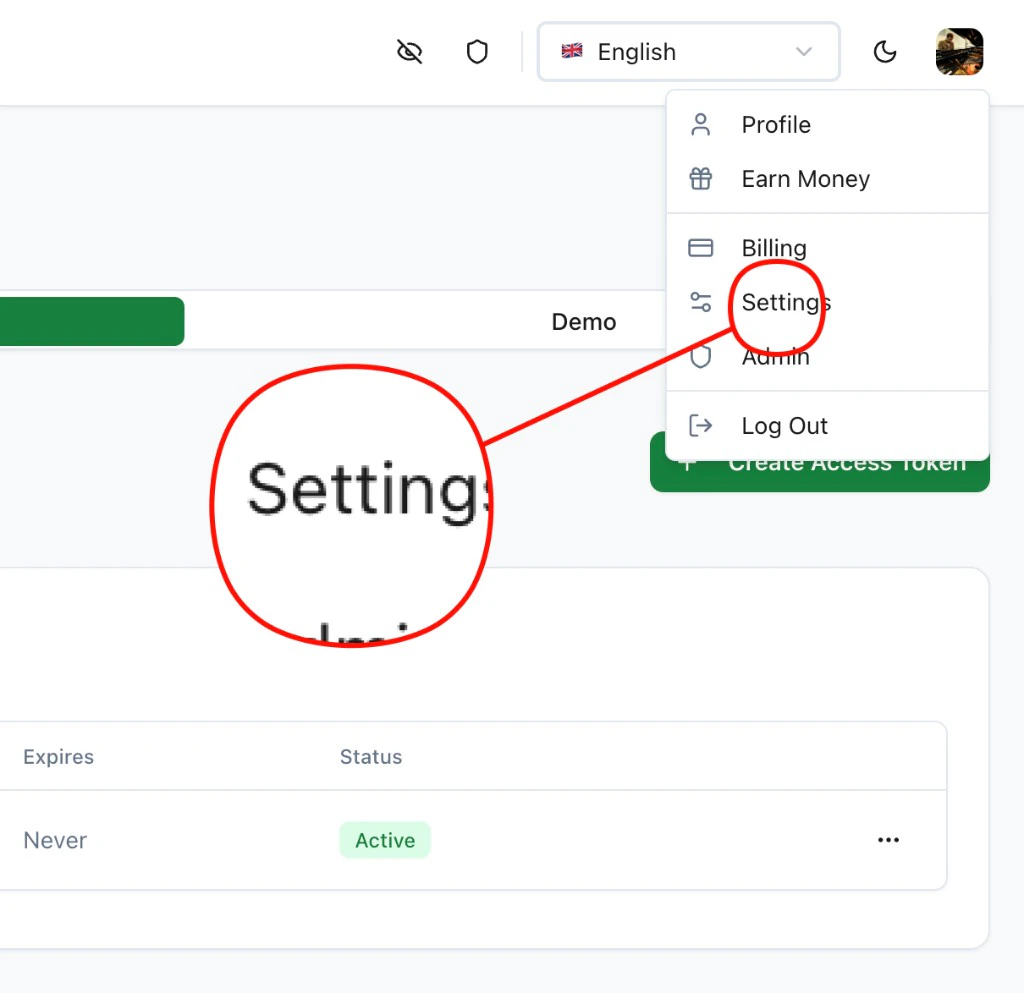
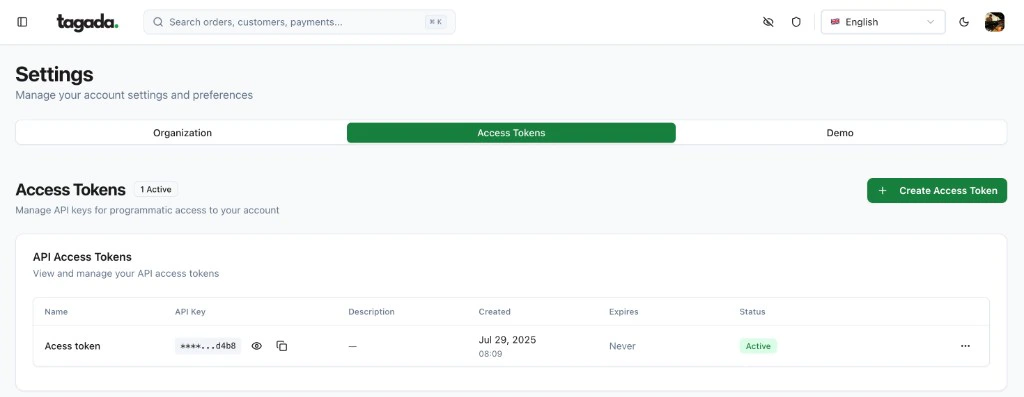
## Path 3 — The dashboard (existing account)
If you already have a Tagada account and just need a new key:
Click your avatar (top-right) → **Settings**.
 Go to **Access Tokens** → **+ Create Access Token**. Copy the UUID.
 ***
## What the API key gives you
The key minted via `tagada-init` / `Tagada.public()` has **`org:admin`** scope on the new account — it can do everything the SDK exposes:
| Surface | What you can call |
| ------------------ | ---------------------------------------------- |
| Stores & products | `tagada.stores.*`, `tagada.products.*` |
| Processors & flows | `tagada.processors.*`, `tagada.paymentFlows.*` |
| Payments & orders | `tagada.payments.*`, `tagada.orders.*` |
| Customers & subs | `tagada.customers.*`, `tagada.subscriptions.*` |
| Webhooks | `tagada.webhooks.*`, `tagada.events.*` |
| Plugins / pages | `tagada.plugins.*` |
For multi-tenant setups that mint *per-merchant* keys from a partner account, see the [Partners tab](/developer-tools/partners/introduction).
***
## Security model — quick notes
* **OTP delivery:** 6-digit, single-use, expires after 5 minutes. Generated with a CSPRNG (`crypto.randomInt`).
* **Rate limits:** 3 sends / 10 min / IP and 5 sends / hour / email on `start`; 10 verifies / 10 min / IP on `verify` (fail-closed if our cache is unavailable, so brute-forcing isn't possible during outages).
* **Lock-screen-safe email:** the subject is `"Verify your TagadaPay account"` and the lock-screen preview is `"Open this email to see your verification code."` — the code itself is only inside the email body.
* **Single-claim provisioning:** even if `verify` is called twice in parallel with the same correct code, only one of the calls provisions an account — the other gets `no_pending_code`.
***
## Next steps
Use Claude, Lovable, or v0 with the key you just minted.
Create stores, products, and process payments from your server.
***
## What the API key gives you
The key minted via `tagada-init` / `Tagada.public()` has **`org:admin`** scope on the new account — it can do everything the SDK exposes:
| Surface | What you can call |
| ------------------ | ---------------------------------------------- |
| Stores & products | `tagada.stores.*`, `tagada.products.*` |
| Processors & flows | `tagada.processors.*`, `tagada.paymentFlows.*` |
| Payments & orders | `tagada.payments.*`, `tagada.orders.*` |
| Customers & subs | `tagada.customers.*`, `tagada.subscriptions.*` |
| Webhooks | `tagada.webhooks.*`, `tagada.events.*` |
| Plugins / pages | `tagada.plugins.*` |
For multi-tenant setups that mint *per-merchant* keys from a partner account, see the [Partners tab](/developer-tools/partners/introduction).
***
## Security model — quick notes
* **OTP delivery:** 6-digit, single-use, expires after 5 minutes. Generated with a CSPRNG (`crypto.randomInt`).
* **Rate limits:** 3 sends / 10 min / IP and 5 sends / hour / email on `start`; 10 verifies / 10 min / IP on `verify` (fail-closed if our cache is unavailable, so brute-forcing isn't possible during outages).
* **Lock-screen-safe email:** the subject is `"Verify your TagadaPay account"` and the lock-screen preview is `"Open this email to see your verification code."` — the code itself is only inside the email body.
* **Single-claim provisioning:** even if `verify` is called twice in parallel with the same correct code, only one of the calls provisions an account — the other gets `no_pending_code`.
***
## Next steps
Use Claude, Lovable, or v0 with the key you just minted.
Create stores, products, and process payments from your server.