> ## Documentation Index
> Fetch the complete documentation index at: https://docs.tagada.io/llms.txt
> Use this file to discover all available pages before exploring further.
# VIP tag offers
> Segment the post-purchase offer with CRM customer tags — VIPs get an exclusive, everyone else gets a welcome price, via customer.hasTag
# VIP tag offers
**Time**: \~15 minutes | **Difficulty**: Beginner | **Type**: part of [Funnel demos](/developer-tools/funnel-demos/introduction)
**Finished project:** [`vip-tag-offers`](https://github.com/TagadaPay/examples/tree/main/vip-tag-offers). Clone it if you want the working app first — or keep reading and rebuild the same graph.
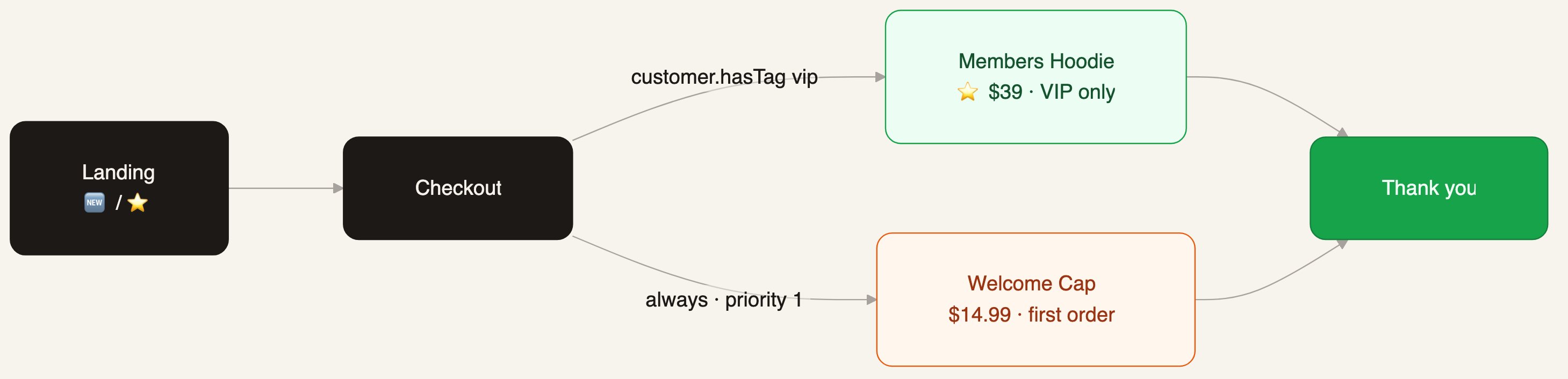
Everyone buys the same tee. The one-click offer after payment depends on the customer's CRM tags: a `vip` tag unlocks a members-only hoodie, everyone else gets a welcome-priced cap. Tags come from your CRM — set them from purchase history, LTV, a loyalty program, or by hand — and the funnel reads them at routing time.
 ***
## What you need
| Resource | Role | Example |
| ----------------- | ------------------------------ | ----------------------- |
| Main product | Cart on landing / checkout | Essential Tee · \$29.99 |
| VIP offer product | One-click offer, `vip` tag | Members Hoodie · \$39 |
| Welcome product | One-click offer, everyone else | Welcome Cap · \$14.99 |
| 2 checkout offers | One per segment | `type: 'upsell'` |
Prices are **integer cents** (`3900` = \$39).
***
## The graph
Four steps. The split is two edges out of checkout — the tag edge outranks the `always` fallback.
| Step | `type` | Path | Bound offer |
| ------------- | ---------- | ------------------------- | ----------- |
| Landing | `landing` | `/` | — |
| Checkout | `checkout` | `/checkout` | — |
| VIP offer | `offer` | `/offer-vip/:orderId` | Hoodie \$39 |
| Welcome offer | `offer` | `/offer-welcome/:orderId` | Cap \$14.99 |
| Thank you | `thankyou` | `/thankyou/:orderId` | — |
| Edge | `when` | `priority` |
| ------------------------ | ---------------------------------- | ---------- |
| Checkout → VIP offer | `customer.hasTag` `{ tag: 'vip' }` | 10 |
| Checkout → Welcome offer | `always` | 1 |
| Each offer → Thank you | (none — accept or decline) | — |
```ts theme={null}
edges: [
{ id: 'e_land', source: 'step_landing', target: 'step_checkout' },
{
id: 'e_vip',
source: 'step_checkout',
target: 'step_offer_vip',
conditions: { when: { 'customer.hasTag': { tag: 'vip' } }, priority: 10 },
},
{
id: 'e_welcome',
source: 'step_checkout',
target: 'step_offer_welcome',
conditions: { when: 'always', priority: 1 },
},
{ id: 'e_vip_done', source: 'step_offer_vip', target: 'step_thankyou' },
{ id: 'e_welcome_done', source: 'step_offer_welcome', target: 'step_thankyou' },
]
```
The tag family goes further than one tag: `customer.hasAnyTag` `{ tags: 'vip,wholesale' }`, `customer.hasAllTags`, and `customer.hasTagPrefix` `{ prefix: 'tier-' }`. Attribution conditions like `customer.fromUtmSource` `{ source: 'facebook' }` work the same way if you would rather split by traffic source than by segment.
***
## Same type on the Headless SDK
Self-hosted, the split is one `if` before you render the offer. The [finished project](https://github.com/TagadaPay/examples/tree/main/vip-tag-offers) keeps `/offer` as **one route**:
```tsx theme={null}
// /offer — one route, two possible offers
export function TagOffer() {
if (hasTag('vip')) {
return (
);
}
return (
);
}
```
Accepting still charges the saved card in one click via `processOfferPayment({ offerId, mainOrderId })`.
The demo app puts a **persona toggle (🆕 new / ⭐ VIP) on the landing** so you can walk both branches from one browser — it stands in for the CRM tag lookup. In production, resolve tags from the logged-in customer, or let the hosted funnel edges read them for you.
***
## Paths the customer can take
| Customer | Offer shown | If accepted |
| -------------- | ------------------- | ------------ |
| ⭐ Tagged `vip` | Members Hoodie \$39 | Tee + hoodie |
| 🆕 No tag | Welcome Cap \$14.99 | Tee + cap |
Every accepted offer appears on thank you as a **related order** (`relatedOrders[]`), exactly like the [basic post-purchase](/developer-tools/funnel-demos/basic-post-purchase#thank-you-related-orders) demo.
***
## Next
Clone `vip-tag-offers` and walk both branches in a minute
Start here if this is your first funnel demo
Same split, driven by the real order total
Nodes, edges, conditions, priorities
***
## What you need
| Resource | Role | Example |
| ----------------- | ------------------------------ | ----------------------- |
| Main product | Cart on landing / checkout | Essential Tee · \$29.99 |
| VIP offer product | One-click offer, `vip` tag | Members Hoodie · \$39 |
| Welcome product | One-click offer, everyone else | Welcome Cap · \$14.99 |
| 2 checkout offers | One per segment | `type: 'upsell'` |
Prices are **integer cents** (`3900` = \$39).
***
## The graph
Four steps. The split is two edges out of checkout — the tag edge outranks the `always` fallback.
| Step | `type` | Path | Bound offer |
| ------------- | ---------- | ------------------------- | ----------- |
| Landing | `landing` | `/` | — |
| Checkout | `checkout` | `/checkout` | — |
| VIP offer | `offer` | `/offer-vip/:orderId` | Hoodie \$39 |
| Welcome offer | `offer` | `/offer-welcome/:orderId` | Cap \$14.99 |
| Thank you | `thankyou` | `/thankyou/:orderId` | — |
| Edge | `when` | `priority` |
| ------------------------ | ---------------------------------- | ---------- |
| Checkout → VIP offer | `customer.hasTag` `{ tag: 'vip' }` | 10 |
| Checkout → Welcome offer | `always` | 1 |
| Each offer → Thank you | (none — accept or decline) | — |
```ts theme={null}
edges: [
{ id: 'e_land', source: 'step_landing', target: 'step_checkout' },
{
id: 'e_vip',
source: 'step_checkout',
target: 'step_offer_vip',
conditions: { when: { 'customer.hasTag': { tag: 'vip' } }, priority: 10 },
},
{
id: 'e_welcome',
source: 'step_checkout',
target: 'step_offer_welcome',
conditions: { when: 'always', priority: 1 },
},
{ id: 'e_vip_done', source: 'step_offer_vip', target: 'step_thankyou' },
{ id: 'e_welcome_done', source: 'step_offer_welcome', target: 'step_thankyou' },
]
```
The tag family goes further than one tag: `customer.hasAnyTag` `{ tags: 'vip,wholesale' }`, `customer.hasAllTags`, and `customer.hasTagPrefix` `{ prefix: 'tier-' }`. Attribution conditions like `customer.fromUtmSource` `{ source: 'facebook' }` work the same way if you would rather split by traffic source than by segment.
***
## Same type on the Headless SDK
Self-hosted, the split is one `if` before you render the offer. The [finished project](https://github.com/TagadaPay/examples/tree/main/vip-tag-offers) keeps `/offer` as **one route**:
```tsx theme={null}
// /offer — one route, two possible offers
export function TagOffer() {
if (hasTag('vip')) {
return (
);
}
return (
);
}
```
Accepting still charges the saved card in one click via `processOfferPayment({ offerId, mainOrderId })`.
The demo app puts a **persona toggle (🆕 new / ⭐ VIP) on the landing** so you can walk both branches from one browser — it stands in for the CRM tag lookup. In production, resolve tags from the logged-in customer, or let the hosted funnel edges read them for you.
***
## Paths the customer can take
| Customer | Offer shown | If accepted |
| -------------- | ------------------- | ------------ |
| ⭐ Tagged `vip` | Members Hoodie \$39 | Tee + hoodie |
| 🆕 No tag | Welcome Cap \$14.99 | Tee + cap |
Every accepted offer appears on thank you as a **related order** (`relatedOrders[]`), exactly like the [basic post-purchase](/developer-tools/funnel-demos/basic-post-purchase#thank-you-related-orders) demo.
***
## Next
Clone `vip-tag-offers` and walk both branches in a minute
Start here if this is your first funnel demo
Same split, driven by the real order total
Nodes, edges, conditions, priorities