 ***
## What you need
| Resource | Role | Example |
| ----------------- | ------------------------------------- | ------------------------- |
| Main product | Cart on landing / checkout (1× or 2×) | Essential Tee · \$29.99 |
| Premium product | One-click offer, total ≥ \$50 | Heavyweight Hoodie · \$39 |
| Add-on product | One-click offer, total \< \$50 | Crew Socks · \$9 |
| 2 checkout offers | One per tier | `type: 'upsell'` |
Prices are **integer cents** — the \$50 threshold is `5000`.
***
## The graph
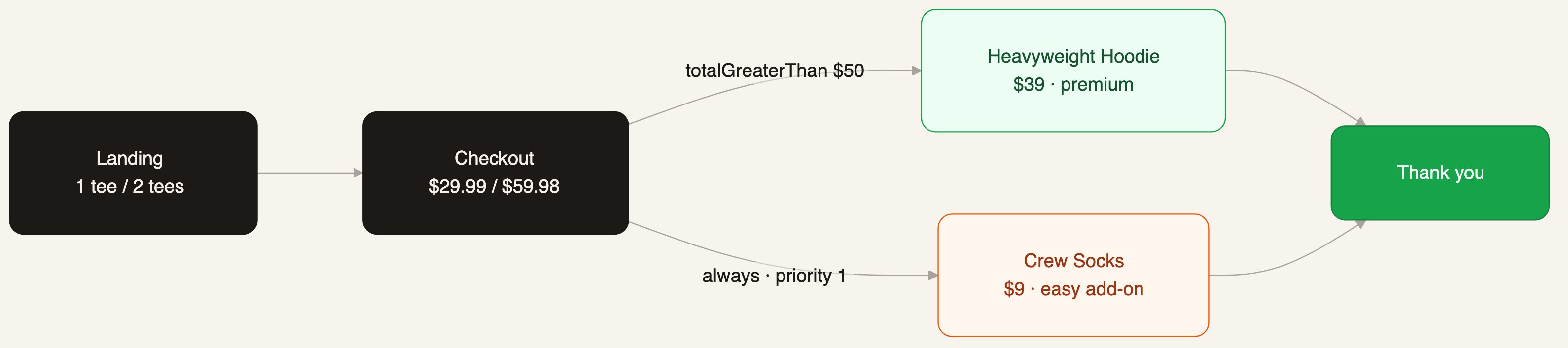
Four steps. The split is two edges out of checkout — the total edge outranks the `always` fallback.
| Step | `type` | Path | Bound offer |
| ------------- | ---------- | ------------------------ | ----------- |
| Landing | `landing` | `/` | — |
| Checkout | `checkout` | `/checkout` | — |
| Premium offer | `offer` | `/offer-hoodie/:orderId` | Hoodie \$39 |
| Add-on offer | `offer` | `/offer-socks/:orderId` | Socks \$9 |
| Thank you | `thankyou` | `/thankyou/:orderId` | — |
| Edge | `when` | `priority` |
| ------------------------ | ----------------------------------------------- | ---------- |
| Checkout → Premium offer | `mainOrder.totalGreaterThan` `{ amount: 5000 }` | 10 |
| Checkout → Add-on offer | `always` | 1 |
| Each offer → Thank you | (none — accept or decline) | — |
```ts theme={null}
edges: [
{ id: 'e_land', source: 'step_landing', target: 'step_checkout' },
{
id: 'e_premium',
source: 'step_checkout',
target: 'step_offer_hoodie',
conditions: { when: { 'mainOrder.totalGreaterThan': { amount: 5000 } }, priority: 10 },
},
{
id: 'e_addon',
source: 'step_checkout',
target: 'step_offer_socks',
conditions: { when: 'always', priority: 1 },
},
{ id: 'e_premium_done', source: 'step_offer_hoodie', target: 'step_thankyou' },
{ id: 'e_addon_done', source: 'step_offer_socks', target: 'step_thankyou' },
]
```
***
## What you need
| Resource | Role | Example |
| ----------------- | ------------------------------------- | ------------------------- |
| Main product | Cart on landing / checkout (1× or 2×) | Essential Tee · \$29.99 |
| Premium product | One-click offer, total ≥ \$50 | Heavyweight Hoodie · \$39 |
| Add-on product | One-click offer, total \< \$50 | Crew Socks · \$9 |
| 2 checkout offers | One per tier | `type: 'upsell'` |
Prices are **integer cents** — the \$50 threshold is `5000`.
***
## The graph
Four steps. The split is two edges out of checkout — the total edge outranks the `always` fallback.
| Step | `type` | Path | Bound offer |
| ------------- | ---------- | ------------------------ | ----------- |
| Landing | `landing` | `/` | — |
| Checkout | `checkout` | `/checkout` | — |
| Premium offer | `offer` | `/offer-hoodie/:orderId` | Hoodie \$39 |
| Add-on offer | `offer` | `/offer-socks/:orderId` | Socks \$9 |
| Thank you | `thankyou` | `/thankyou/:orderId` | — |
| Edge | `when` | `priority` |
| ------------------------ | ----------------------------------------------- | ---------- |
| Checkout → Premium offer | `mainOrder.totalGreaterThan` `{ amount: 5000 }` | 10 |
| Checkout → Add-on offer | `always` | 1 |
| Each offer → Thank you | (none — accept or decline) | — |
```ts theme={null}
edges: [
{ id: 'e_land', source: 'step_landing', target: 'step_checkout' },
{
id: 'e_premium',
source: 'step_checkout',
target: 'step_offer_hoodie',
conditions: { when: { 'mainOrder.totalGreaterThan': { amount: 5000 } }, priority: 10 },
},
{
id: 'e_addon',
source: 'step_checkout',
target: 'step_offer_socks',
conditions: { when: 'always', priority: 1 },
},
{ id: 'e_premium_done', source: 'step_offer_hoodie', target: 'step_thankyou' },
{ id: 'e_addon_done', source: 'step_offer_socks', target: 'step_thankyou' },
]
```
Checking your order total…
; if (order.amount >= 5000) { return (